


Your Partner for Interactive Classroom Projects
HDFocus provides classroom interactive whiteboard solutions for schools, education project integrators and equipment distributors. From display size selection and system configuration to installation support, bulk order delivery and OEM customization, we help you build a more efficient and interactive classroom environment.


Why Interactive Whiteboards Matter in Modern Classrooms
Traditional classroom equipment often requires separate projectors, whiteboards, computers, speakers and connection cables. This can make daily teaching less efficient, especially when teachers need to switch between different devices or display digital teaching materials clearly to every student.
An interactive whiteboard combines display, writing, touch interaction, wireless sharing and multimedia teaching into one integrated classroom device. It helps schools simplify classroom setup, improve content visibility and create a more engaging teaching environment.
Limited display clarity
Projectors may lose brightness in daylight classrooms, making text, diagrams and videos difficult to see clearly from the back rows.
Low student interaction
Traditional teaching tools are often designed for one-way presentation, which limits group discussion, student participation and interactive learning.
Multiple devices to manage
Separate projectors, computers, speakers and whiteboards can increase installation complexity and maintenance work.
Inconsistent classroom setup
For school projects with many classrooms, different equipment combinations can make training, management and after-sales support more difficult.
Time wasted before class
Teachers may need extra time to connect cables, switch input sources or prepare multiple devices before starting a lesson.
An interactive whiteboard can replace several separate classroom devices and provide a more unified teaching platform. Teachers can write, annotate, display lesson materials, share screens and interact with students directly on the same screen.
Choose the Right Interactive Whiteboard for Each Classroom Type
Different classrooms require different display sizes, installation methods and system configurations. HDFocus helps project buyers and education
integrators match the right interactive whiteboard solution according to classroom size, viewing distance, teaching style and budget.
Small classrooms, language learning rooms and training rooms usually require a cost-effective display that supports clear teaching content, touch writing and basic multimedia use.
-
Recommended Size: 65-inch or 75-inch
-
Suitable For: Small classrooms, language classrooms, tutoring rooms, training spaces
-
Recommended Setup: Android system or Android + Windows optional
-
Installation Option: Wall-mounted installation or mobile stand
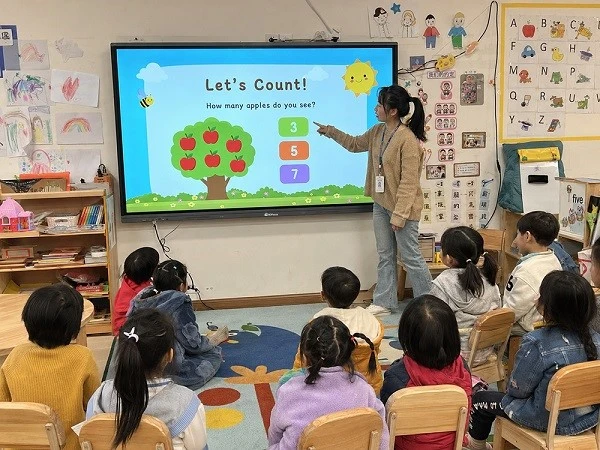
Standard classrooms need a balanced solution for daily teaching, digital lesson display, writing, annotation and student interaction.
-
Recommended Size: 75-inch or 86-inch
-
Suitable For: Primary schools, secondary schools, regular classrooms, multimedia classrooms
-
Recommended Setup: Android system with optional OPS Windows computer
-
Installation Option: Wall-mounted installation
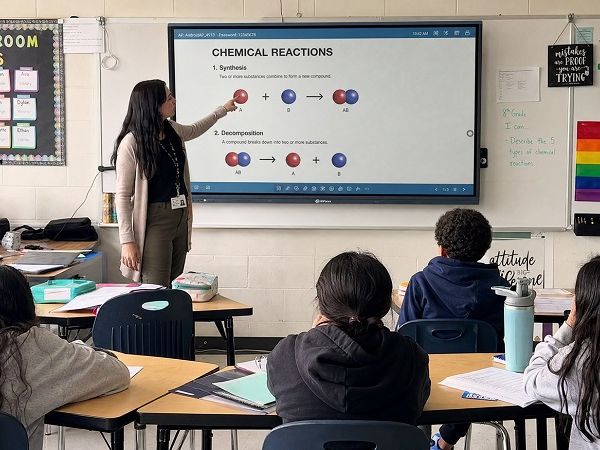
Large classrooms, lecture rooms and shared learning spaces need a bigger screen to ensure that students in the back rows can clearly see teaching content.
-
Recommended Size: 86-inch, 98-inch or 110-inch
-
Suitable For: Large classrooms, lecture rooms, university classrooms, presentation rooms
-
Recommended Setup: Android + Windows dual-system option
-
Installation Option: Wall-mounted installation or floor stand

Some schools and training centers need movable teaching equipment for shared rooms, temporary classes or flexible learning spaces.
-
Recommended Size: 75-inch or 86-inch
-
Suitable For: Training centers, shared classrooms, temporary teaching spaces, seminar rooms
-
Recommended Setup: Android + Windows optional
-
Installation Option: Mobile stand with wheels


Small Classrooms

Standard Classrooms

Large Classrooms

Flexible Learning Spaces
Recommended Interactive Whiteboard Configurations for
Different Classroom Sizes
Choosing the right interactive whiteboard is not only about screen size. For classroom projects, buyers also need to consider viewing distance, teaching
software, operating system, installation method, accessories and long-term maintenance.
| Classroom Type | Suggested Display Size | Recommended System | Installation Method | Buyer Note |
|---|---|---|---|---|
| Small Classroom | 65-inch / 75-inch | Android or Android + Windows optional | Wall-mounted or mobile stand | Suitable for limited teaching spaces and budget-conscious projects |
| Standard Classroom | 75-inch / 86-inch | Android with optional OPS Windows | Wall-mounted | Suitable for most school classroom upgrades |
| Large Classroom | 86-inch / 98-inch / 110-inch | Android + Windows recommended | Wall-mounted or floor stand | Better visibility for larger rooms and back-row students |
| Training Room | 75-inch / 86-inch | Dual system optional | Mobile stand optional | Flexible for different teachers, courses and room layouts |
| Multimedia Classroom | 86-inch / 98-inch / 110-inch | Android + Windows recommended | Wall-mounted | Suitable for video, presentation and interactive teaching |
For bulk classroom projects, our team can help you compare different sizes and configurations based on classroom layout,
installation environment and purchasing requirements.
Key Features That Support Classroom Teaching
HDFocus interactive whiteboards are designed to make teaching more visual, interactive and efficient. Each function is selected to support real classroom
use, from daily lesson display to group discussion and digital content sharing.

The high-resolution display makes text, images, diagrams and videos clearer for classroom teaching. It helps students see lesson content more easily, even in larger classrooms.
Multi-touch support allows teachers and students to write, annotate and interact on the screen. It is suitable for group activities, classroom discussion and interactive exercises.
Different schools may use different teaching software and file formats. HDFocus provides flexible system configuration options, including Android system and optional Windows OPS computer.
Teachers can share content from laptops, tablets or mobile devices without relying only on cables. This makes classroom presentation more flexible and efficient.
The digital whiteboard software supports writing, annotation, erasing, saving and lesson review. Teachers can explain ideas directly on the screen and keep important content for later use.
HDMI, USB, Type-C and other connection options can support common classroom devices such as laptops, document cameras, microphones and external teaching equipment.
For training rooms or flexible classrooms, a mobile stand allows the interactive whiteboard to be moved between different spaces.
AI-Powered Teaching Tools for Modern Classrooms
Our interactive whiteboard is equipped with practical AI tools designed to make classroom teaching more efficient, more interactive and easier for teachers to manage. From voice assistance and smart annotation to OCR and AI-powered whiteboard tools, these functions help turn the display into a more intelligent teaching assistant.

Supports voice-based interaction for quicker operation and easier classroom use. Teachers can access useful functions more efficiently and reduce manual steps during lessons.

Makes it easier to mark key points, highlight important content and support lesson explanation more clearly during teaching.

The AI camera can quickly recognize the number of people in the room and support random participant selection. It also supports automatic face & voice tracking, keeping the speaker clearly framed and improving the remote communication experience.

Allows users to capture on-screen content and extract text quickly, making it easier to save, edit or reuse lesson information.

Provides intelligent support for question answering, idea generation and content assistance, helping teachers and students explore topics more interactively.
Recommended Interactive Whiteboard Models for Classrooms
HDFocus offers multiple interactive whiteboard sizes for different classroom environments and project budgets. The following models are commonly selected for education projects.
A practical choice for small classrooms, tutoring rooms and training spaces. It provides interactive writing, clear display and essential teaching functions in a compact size.
Best For: Small classrooms and training rooms
Recommended Use: Daily teaching, small group learning, language rooms
A balanced option for standard classrooms. It offers a larger display area while still being suitable for many classroom layouts.
Best For: Standard classrooms
Recommended Use: School classroom upgrades, multimedia teaching, interactive lessons
A popular choice for larger classrooms and school projects. It provides better visibility and a more comfortable teaching experience for both teachers and students.
Best For: Standard and large classrooms
Recommended Use: K-12 classrooms, lecture rooms, multimedia classrooms
A large-format solution for lecture rooms, university classrooms, training halls and presentation spaces where viewing distance is longer.
Best For: Large classrooms and lecture rooms
Recommended Use: Higher education, lecture halls, presentation rooms, large training spaces
We help you understand the project requirements, including classroom size, quantity, teaching scenario, installation environment and system configuration.
Based on your classroom layout and budget, we recommend suitable interactive whiteboard sizes and configurations.
We provide interactive whiteboards in different sizes to meet different classroom and training room needs.
Android system and optional Windows OPS configuration are available according to teaching software and project requirements.
Wall mount brackets, mobile stands and related accessories can be provided for different classroom deployment methods.
User manuals, installation guidance and product information can be provided to support education integrators and project teams.
For bulk classroom orders, we provide protective packaging suitable for international transportation.
Our team can provide remote guidance for installation, setup and daily use after delivery.
For education distributors and brand partners, we can support logo, packaging and configuration customization.
What's Included in Our Classroom Interactive Whiteboard Solution
A classroom solution is more than a single interactive whiteboard. For education projects, buyers need a complete package that supports product selection, installation, delivery and long-term use.
HDFocus provides support from early project communication to final delivery and after-sales service.
Request a Complete Classroom SolutionEasy Deployment for Education Projects
For school projects and classroom upgrades, easy installation and system compatibility are important. HDFocus interactive whiteboards are designed to support common classroom environments and project integration needs.

Wall-Mounted Installation
Wall-mounted installation is suitable for fixed classrooms and long-term classroom use. It helps create a clean and stable teaching environment.


Mobile Stand Option
A mobile stand is suitable for training rooms, shared classrooms and flexible learning spaces where the display needs to be moved between different rooms.

OPS Computer Support
Optional OPS Windows computer support allows schools to run Windows-based teaching software, office files and classroom applications.

Common Classroom Connections
HDMI, USB, Type-C and other connection options help connect laptops, document cameras and other teaching devices.

Support for Project Integrators
We can provide product information, installation guidance and technical communication support for education system integrators.

Suitable for Bulk Classroom Deployment
For school projects with multiple classrooms, we can help keep model selection, packaging and configuration more consistent, making deployment and after-sales management easier.
Classroom Project Case Studies


OEM / ODM Interactive Whiteboard Service for Education Distributors
For education equipment distributors, local brands and project suppliers, HDFocus provides OEM and ODM support for interactive whiteboard projects. We understand that different markets may have different requirements for branding, system configuration, packaging and product positioning. Our team can support flexible customization based on your order plan and local market needs.
Customization Options
Frequently Asked Questions
Q1: What size interactive whiteboard is suitable for a standard classroom?
For many standard classrooms, 75-inch and 86-inch interactive whiteboards are commonly selected. The final size should depend on classroom area, viewing distance, installation position and teaching content.
Q2: Is a 65-inch interactive whiteboard suitable for classrooms?
Yes. A 65-inch interactive whiteboard is suitable for small classrooms, tutoring rooms, language learning rooms and training spaces where the viewing distance is shorter.
Q3: When should I choose an 86-inch or larger interactive whiteboard?
An 86-inch or larger interactive whiteboard is recommended for larger classrooms, lecture rooms and multimedia classrooms where students need to see content clearly from a longer distance.
Q4: Can we choose Android-only or Android + Windows system?
Yes. Android system is suitable for basic teaching, writing and media display. For schools that need Windows software, office files or specific teaching applications, an optional OPS Windows computer can be selected.
Q5: Is this solution suitable for bulk classroom projects?
Yes. HDFocus can support bulk classroom projects with model recommendation, configuration selection, packaging support and delivery communication.
Q6: Do you support OEM or private label for education distributors?
Yes. We support OEM and private label customization, including logo, boot screen, packaging and configuration options according to order requirements.
Q7: Can you provide technical documents for installation?
Yes. We can provide product information, user manuals and installation guidance to support project integrators and education equipment suppliers.
Q8: What installation methods are available?
Common installation methods include wall-mounted installation and mobile stand installation. Wall-mounted installation is suitable for fixed classrooms, while mobile stands are suitable for flexible classrooms and training rooms.
Q9: Can the interactive whiteboard connect with laptops and other classroom devices?
Yes. Interactive whiteboards can support common connection methods such as HDMI, USB and Type-C, depending on the selected model and configuration.
Q10: How are interactive whiteboards packed for international shipment?
Interactive whiteboards are packed with protective materials suitable for international transportation. For bulk orders, packaging can be arranged according to project and shipping requirements.
Q11: Do you provide after-sales technical support?
Yes. HDFocus provides remote technical support and product guidance to help customers with setup, operation and daily use.
Q12: How can I get a recommended classroom solution?
You can share your classroom size, quantity, installation method, preferred system and target market. Our team will recommend suitable interactive whiteboard models and configurations for your project.