

What is the Functions of HDFocus Interactive Whiteboard?
Apr 01, 2025
Leave a message
As a professional interactive whiteboard supplier, HDFocus has various styles of smart whiteboards, such as CY-Series Interactive Board, CM-Series Interactive Board, and CK-Series Interactive Board, which can meet various application scenarios such as education and enterprises. In order to help some wholesalers who want to buy interactive whiteboard to learn more about our products, HDFocus will introduce the common functions of our best interactive whiteboards.
Common Functions of HDFocus Interactive Whiteboard
|
1. Navigation control: • Sidebar buttons: Back, Home, App Switch, Annotation, Signal Source, System Setting • Page management: Add/Switch/Preview/Flip pages (supports multi-page whiteboard operation) |
2. Interactive tools: • Brush tool: ◦ Pencil/Pen/Smart text recognition pen/Smart graphic recognition pen ◦ Color palette (16 colors) and 6 levels of thickness adjustment • Eraser tool: ◦ Normal erase/selection erase/clear screen ◦ Three size switches |
3. Teaching assistance: • Teaching kit: ◦ Geometry tools (compass, triangle ruler, protractor, ruler) ◦ Classroom tools (timer, calculator, voting system) ◦ Spotlight function ◦ Split screen display: support multi-tasking interface split |
|
4. Content management function: • File operation: ◦ Support file insertion (document/signal source/window) ◦ Scan QR code to transfer files to whiteboard ◦ Cloud storage and local storage function • Editing function: ◦ Undo/redo operation ◦ Selection tool (can independently operate the selected area) ◦ Graphic intelligent recognition conversion |
5. System management function • Device control: ◦ Signal source switching (HDMI/USB-C interface) ◦ Touch calibration function ◦ Volume adjustment (independent ± control keys) ◦ Brightness adjustment • Security settings: ◦ Child lock function ◦ Camera control ◦ Windows system switcher |
6. Featured functions • Smart recognition pen: automatically convert handwritten content into standard text/graphics • Classroom interactive system: built-in voting and answering functions • Screen recording function: supports recording of operation process • Eye protection mode: one-click to turn on visual protection |
|
7. Extended functionality • Supports multi-user touch operation at the same time • Compatible with Windows system application switching • Annotation function (can be superimposed on any interface) |
8. Wireless screen projection • Multi-platform support: The screen of iOS/Android/Windows/macOS/Chrome OS/Ubuntu devices is wirelessly transmitted to the receiver. • Reverse touch: The receiver can reversely control Windows/macOS/Ubuntu computers (except Chrome OS). • Split-screen mode: Multiple devices can be automatically split-screened for simultaneous projection, and exclusive screen switching is supported. |
9. File push • Full format support: push photos, audio and video, documents (Office/APK/e-books, etc.) to the receiving end. • Shared file library: create a shared storage space, and devices in the local area network can upload/download files. |
|
10. Wireless control and interaction • Remote control function: The mobile phone simulates the mouse, keyboard, touchpad and remote control to operate the receiving end. • Wireless annotation: Real-time annotation on the receiving end screen (supports pen thickness/color adjustment). • Reverse mirroring: The receiving end screen is transmitted back to the client, supporting multi-touch operation. |
11. Wireless Camera Transmit the phone's camera image and microphone sound to the receiving end in real time, and support flash/front and rear camera switching. |
12. Intelligent full screen adaptation Automatically adjust the projection screen ratio to fit the receiving end screen (may be deformed) |
Advanced Functions of HDFocus Interactive Whiteboard
|
1. Host mode • Permission control: The host can manage permissions such as screen projection, reverse control, annotation, and exclusive screen. • Screen projection invitation: Supports automatic acceptance or authorization of screen projection requests. |
2. Multi-screen and group collaboration • Multi-screen display: supports up to 4 devices split screen, and can switch the sound output source. • One-to-many (screen group): Synchronously project the screen to multiple receiving ends, suitable for cross-regional collaboration. |
3. Compatible with protocol extensions • AirPlay: iOS/macOS native mirroring screen without installing apps. • DLNA: Compatible with third-party DLNA apps for direct screen projection. |
Types of HDFocus Interactive Whiteboard
HDFocus interactive electronic whiteboards come in a variety of models and sizes, so whether you are looking for an education or business solution, there is a suitable interactive whiteboard solution to choose from.

The CY series interactive whiteboards are available in 55 inch, 65 inch, 75 inch, 85 inch, 86 inch, and 98 inch sizes.

The CK series interactive whiteboards include all sizes of the CY series, as well as a 110 inch interactive whiteboard.
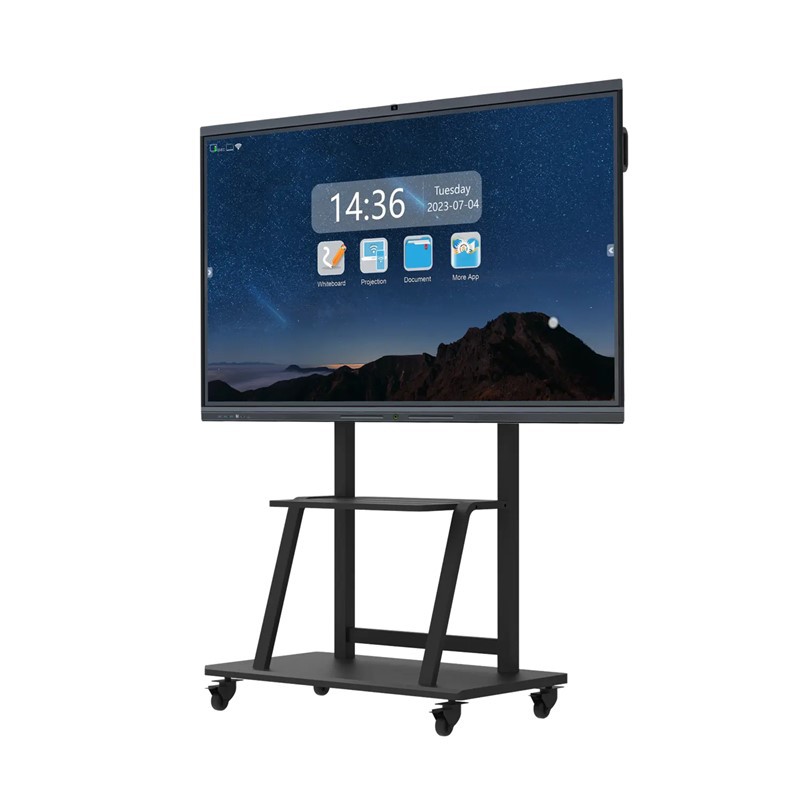
The CM series interactive whiteboards come in a variety of sizes, including 55 inches, 65 inches, 75 inches, 85 inches, 86 inches, 98 inches, 105 inches, and 110 inches.
Conclusion
The above are the common functions of HDFocus digital whiteboards and their related product models. If you want to wholesale interactive whiteboards but don't know how to choose an interactive whiteboard supplier, you can check out the article "Five Steps to Choose an Interactive Whiteboard Supplier" for more information.