


Indoor Digital Signage Kiosk
Description
Technical Parameters
55 Inch Indoor Digital Signage Kiosk for Visitor Information
Create a practical digital information point for reception areas, showrooms, commercial facilities and event spaces. The HD-55F-T combines a 55-inch portrait display with 10-point infrared touch, Android 11 and HD-DS digital signage software. Use it to schedule welcome messages, promotions, event information and service content, or configure touch-based information lookup where visitors need to browse and select content themselves.
Designed for indoor commercial deployment, this floor-standing kiosk gives project teams a clear choice between display-led communication and touch-enabled visitor interaction. Content can be prepared on PC or mobile, published through the network, and coordinated across connected terminals when the deployment requires centralized operation.


Project Fit at a Glance
| Project need | HD-55F-T approach |
|---|---|
| Scheduled visitor communication | Publish images, text, links and video content through HD-DS software. |
| Interactive information lookup | 10-point infrared touch supports visitor-led selection and navigation. |
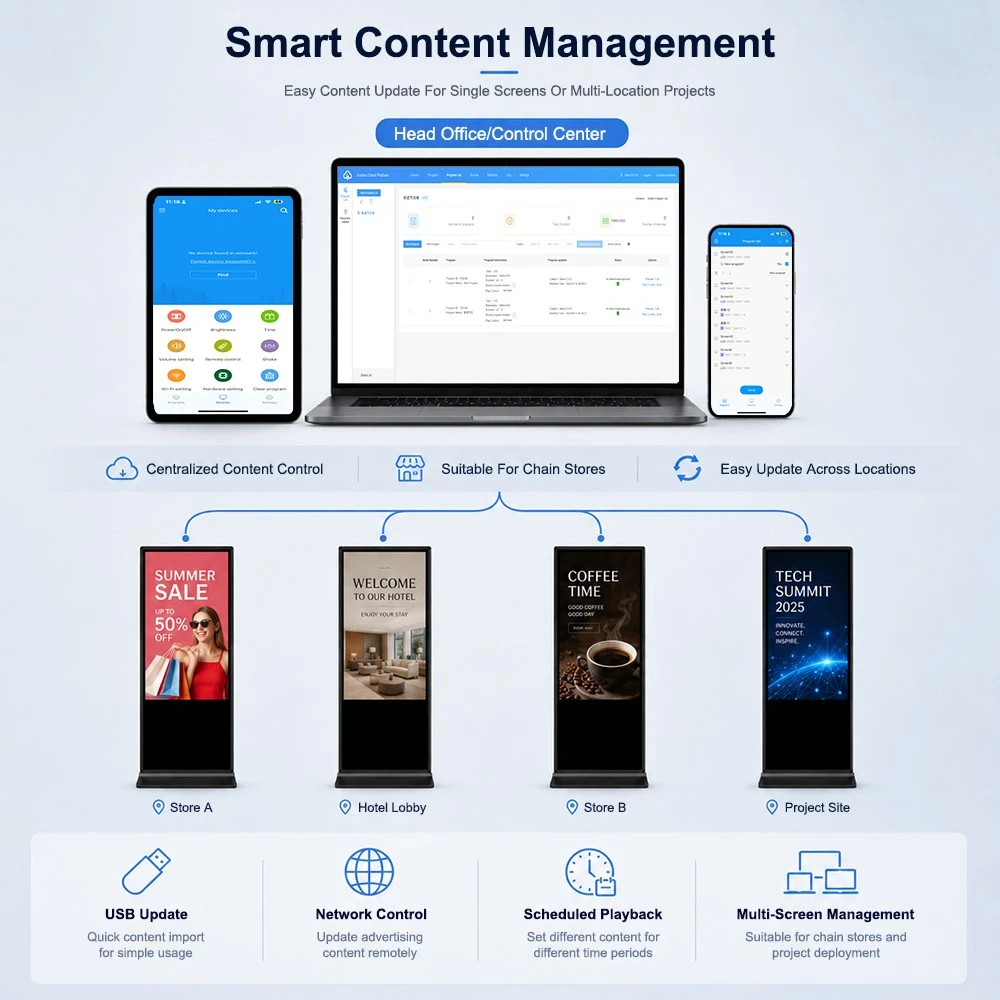
| Multi-location content updates | Network-based central control, program preview and batch publishing are available through HD-DS. |
| On-site or network playback | Content can also be played directly from USB. |
| Indoor commercial deployment | Aluminum edging, tempered-glass touch cover and industrial-level design support daily commercial use. |
Start with the Visitor Task, Not the Screen Size
An indoor digital signage kiosk should be selected around the job it needs to perform at the location. The same 55-inch hardware can support very different visitor journeys depending on content design, touch requirement and operating workflow.
-
Welcome and Campaign Display
Place the kiosk at an entrance, reception desk or event check-in area to show welcome messages, promotions, event schedules and time-sensitive announcements. For this use, plan portrait content that can be understood at a glance by visitors who are walking past or waiting nearby.
-
Information Lookup
Use the infrared touch interface when visitors need to search, select or explore content at their own pace. Typical content may include service information, product introductions, venue notices or event agendas. Confirm the interaction flow and interface design before the project is finalized so that each touch step is easy to understand while standing.
-
Showroom Content Navigation
In a showroom, the kiosk can combine looping product visuals with touch-accessible supporting information. This gives visitors an entry point for product exploration while the sales team retains control of the content structure and publishing schedule.
-
Shared-Facility Communications
For corporate lobbies, training centers and shared commercial facilities, create content plans by place and time: daily notices, meeting or event information, visitor guidance and campaign messages can be prepared as separate programs rather than one static playlist.

Choose Interaction and Content Operation for Each Location
-
When to Use Touch
Choose the touch-enabled HD-55F-T configuration when the visitor must make a choice: opening product information, exploring an agenda, selecting a service topic or moving through a prepared information structure. The 10-point IR touch layer and tempered glass cover support this interaction-led use.
-
When Display-Only Communication Is Clearer
If the location only needs campaigns, welcome messages or scheduled notices, keep the user journey simple. Use portrait content that communicates the main message without requiring interaction. For standard non-touch multi-size advertising display options, link visitors to the existing Vertical Basic Advertising Machine page instead of treating every installation as a touch project.
-
Content Readiness Checklist
Before installing the kiosk, confirm:
- What must visitors learn, find or select at this location?
- Is touch interaction required, or is scheduled visual communication enough?
- Who prepares, approves and publishes the content?
- Will content vary by entrance, reception area, showroom or event zone?
- Is the network arrangement ready for the selected publishing workflow?
- Is there a fallback playlist for occasions when project content needs to be updated?
HD-DS Software for Scheduled and Centralized Content Publishing
The HD-55F-T specification includes HD-DS digital signage software for program creation and publishing. Use the software section to show buyers how the kiosk fits an operating workflow-not as a generic software feature list.
-
Prepare Content for the Right Location
HD-DS supports visual program editing, media-area layout and preset scene applications. Teams can prepare different programs for different visitor points, such as a reception welcome screen, a showroom loop or an event announcement screen.
-
Publish and Review Before Going Live
Program management includes previewing, batch publishing and secondary editing. This supports a review step before content is sent to terminals, helping teams check text, layout and message timing for each location.
-
Coordinate Connected Terminals
With network connectivity, HD-DS supports cloud management and remote central control of multiple terminals. It also supports LAN device management and automatic device search on the local network. Use this option when content needs to be coordinated across multiple indoor kiosk points.
-
Operate Content from PC or Mobile
The supplied specification states that the HD-DS mobile app supports program editing and publishing on Android and iOS, while the PC interface supports program editing. Content types can include images, written descriptions, links and videos. The device also supports direct program playback from USB when that workflow better fits the site.
-
Schedule Routine Operation
HD-DS supports scheduled power on/off and time calibration. Set operating schedules according to the facility's opening hours and content plan. Confirm the final operating process with the site team before rollout.


Specification
Display
|
Display Screen |
55" TFT-LCD with LED backlight |
|
Display Ratio |
16:9 |
|
Color |
16.77M colors (8-bit) |
|
Display area |
1209.6*680.4mm |
|
Resolution |
1920*1080 |
|
Brightness |
350 cd/m² |
|
Contrast |
1100:1 |
|
View Angle |
89° left and right, up and down |
|
Response Time |
Less than 5ms |
|
Life time |
Over 50,000hrs |
Motherboard Performance
|
CPU |
Quad core Cortex-A55, RK3568 |
|
Frequency |
2.0GHz |
|
RAM |
2G (can expand 4G) |
|
Storage |
EMMC 32G (can expand 64G) |
|
GPU |
ARM G52 2EE |
|
Network Card |
10/100M adaptive card |
|
WIFI&Bluetooth |
Support WIFI and Bluetooth 4.2 |
|
4G Function |
Can customize 4G function(optional) |
|
OS |
Android OS 11.0 and above |
Motherboard Interface I/O
|
USB |
USB 3.0*2 |
|
HDMI Output |
HDMI Out*1 |
|
TF card slot |
TF card slot*1 |
|
SIM card slot |
SIM card slot*1 |
|
Headphone Audio Output |
Headphone Audio Output*1 |
|
Network |
RJ45*1 |
|
WIFI |
WIFI*1, support 802.11 b/g/n |
IR Touch
|
Touch Type |
Infra-red |
|
Points |
10 points |
|
Glass cover |
Tempered glass cover |
|
Response Time |
Less than 5ms |
|
Resolution |
32767 * 32767 |
|
Position Accuracy |
±1.5mm |
|
Communication |
USB2.0 |
|
Life Time |
Over 60,000,000 touches |
Others
|
Format |
PAL, NTSC |
|
Speaker |
5W*2 |
|
Freestand Basement |
Basement*1 |
|
Voltage |
AC100-240V 50/60Hz |
|
Power |
≤ 100W |
|
Net Dimension |
1,960 *764*29.3mm |
|
Net Weight |
54KG |
|
Gross Weight |
58KG |
Typical Indoor Deployment Models
-
Reception and Corporate Lobby
Use the kiosk as a stable visitor communication point for welcome content, company updates and meeting or event notices. Plan content in short, readable sections for visitors arriving or waiting in the space. Add touch navigation only when visitors must independently access further information.
-
Showroom and Product Experience Area
Combine scheduled product visuals with touch-accessible product explanations. The display attracts attention from a distance; the touch interface supports deeper exploration when a visitor chooses to engage. Organize the content so the first screen states the product theme clearly and the next layer provides structured detail.
-
Event Venue or Shared Commercial Facility
Prepare location- and time-based programs for agenda updates, directional information and temporary announcements. Where multiple units are deployed, use the network workflow to review and publish the right program to the appropriate terminal group.
FAQ
Q: How do I decide whether this kiosk should be touch-enabled?
A: Choose a touch-enabled configuration when the visitor needs to select, search or explore information. For simple campaign loops, welcome messages or scheduled notices, a display-led content workflow may be sufficient. Define the visitor task before deciding the configuration.
Q: What content can be published to the HD-55F-T?
A: According to the supplied HD-DS specification, content can include images, written descriptions, links and videos. The software supports visual program editing, program previewing and layout of media areas. Prepare the final content around the portrait screen and the intended visitor viewing distance.
Q: Can several indoor kiosks be managed together?
A: Yes. The supplied specification states that HD-DS supports cloud management and remote central control of multiple terminals through networking. It also supports LAN equipment management, automatic device search, batch publishing and program previewing. Confirm the network arrangement and terminal groups as part of the project brief.
Q: Is 4G included as standard?
A: No. The supplied specification lists the 4G function as customizable/optional. Confirm it in the quotation and final configuration if the installation site requires cellular connectivity.
Q: Can the kiosk work without using the network for every update?
A: The supplied specification states that the device supports direct playback of programs from USB. Select the update workflow-USB or network-based publishing-according to the site's maintenance process and content update frequency.
Q: What information should I provide when requesting a kiosk quotation?
A: Provide the deployment purpose, number of units, planned locations, touch requirement, network environment, content operation workflow, requested color or branding, destination and target delivery window. This allows the project team to confirm a suitable configuration before quotation.
Q: Which certifications are listed for this model?
A: The supplied HD-55F-T specification lists CE, RoHS, TELEC and PSE. It also states ISO9001 and ISO14000 certifications. Confirm destination-market compliance and the specific documentation required for your order before purchase.
Hot Tags: indoor digital signage kiosk, China indoor digital signage kiosk manufacturers, suppliers, factory
Previous
Foldable Floor Standing KioskNext
No Information


Quote Now!
We respond to your inquiry within 24 hours. Please take heed of the emails from " amber@hd-focus.com " to ensure timely and effective communication.
As one of the leading display solution manufacturers, we have accumulated rich project experience in digital signage and interactive technologies.